Using Home Assistant for Homelab Monitoring and Automation
Extending Home Assistant beyond smart-home control to monitor server infrastructure, track environmental conditions, provide alerts, and automate remote homelab operations.
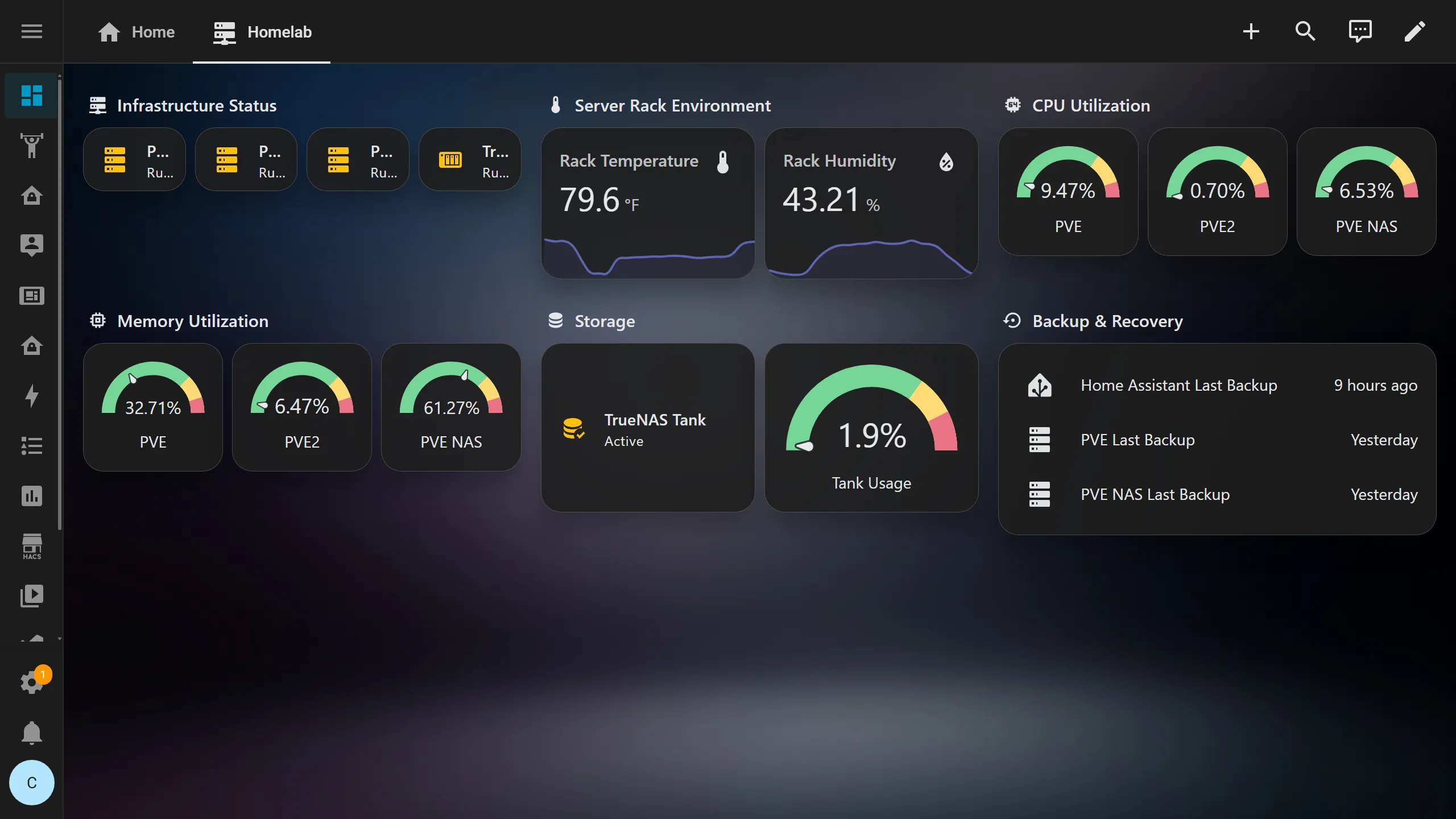
Overview
Home Assistant originally entered my environment as a smart-home platform, but it gradually became useful for something else: homelab operations.
My servers already had traditional monitoring tools, but Home Assistant had access to information those systems did not naturally include, such as room temperature sensors, smart plugs, physical-device state, mobile notifications, and automation logic.
I began integrating the homelab into Home Assistant so it could serve as another operational layer for the environment.
The result combines:
- server and virtualization status
- environmental monitoring
- mobile alerts
- infrastructure dashboards
- remote power control
- backup notifications
- automation
The initial infrastructure-monitoring setup was operational by July 28, 2026 and has continued expanding since then.
Goals
The project had several goals:
- Monitor important infrastructure from Home Assistant
- Integrate Proxmox hosts into the dashboard
- Track server-rack temperature and humidity
- Alert when environmental conditions become concerning
- Avoid repetitive or noisy notifications
- Provide remote power controls for physical servers
- Surface infrastructure status on mobile devices
- Combine physical sensors with traditional server monitoring
- Create useful automation around infrastructure events
Why Home Assistant?
Home Assistant is not a replacement for platforms such as Prometheus, Grafana, or dedicated uptime monitoring.
It provides a different capability.
Traditional infrastructure monitoring is excellent for information such as:
CPU usage
Memory usage
Network throughput
Disk capacity
Service availability
Home Assistant can combine that with information from the physical environment:
Room temperature
Humidity
Power state
Smart plugs
Mobile notifications
Physical sensors
Automation
That creates an interesting bridge between the physical homelab and the software running inside it.
Architecture
A simplified version of the environment looks like:
                     Home Assistant
                           |
          +----------------+----------------+
          |                |                |
          v                v                v
      Proxmox          Environment       Smart Plugs
    Integration          Sensors             |
          |                |                 v
          |                |           Physical Servers
          |                |
          +--------+-------+
                   |
                   v
              Automations
                   |
                   v
          Mobile Notifications
Home Assistant therefore has visibility into both software-defined infrastructure and parts of the physical environment supporting it.
Proxmox Integration
One of the first infrastructure additions was integrating the Proxmox environment with Home Assistant.
This provided entities representing virtualization hosts and workloads.
Instead of opening the Proxmox interface every time I wanted a quick status check, Home Assistant could surface infrastructure information directly on a dashboard.
This became especially useful on mobile devices.
The integration also demonstrated an important difference between management and monitoring.
Home Assistant does not replace the Proxmox administration interface.
Instead, it provides a quick operational view of information that may be useful outside a full management session.
Environmental Monitoring
The server rack sits in a physical environment whose conditions can affect the equipment inside it.
I added temperature and humidity sensors so Home Assistant could track the room and rack environment.
This gives me another layer of observability:
Servers
   |
   +---- CPU temperature
   +---- Resource utilization
   +---- Service health

Physical Environment
   |
   +---- Room temperature
   +---- Rack temperature
   +---- Humidity
Traditional server monitoring might indicate that the systems themselves are operating normally while Home Assistant shows that the surrounding room is becoming warmer than expected.
Those are related but different signals.
Temperature Alerts
Once the environmental sensors were available, I created automations to notify me when the server-rack temperature became too high.
The first version revealed an important problem with alert design.
During the hottest parts of the day, the rack could naturally hover near the recovery threshold.
That caused repeated transitions between:
Warning
   |
   v
Normal
   |
   v
Warning
   |
   v
Normal
The automation technically worked, but the resulting notifications were noisy.
Adding Hysteresis
To prevent repeated alerts, I adjusted the automation so the warning and recovery thresholds were separated.
Conceptually:
Temperature rises
      |
      v
Warning threshold crossed
      |
      v
Send alert


Temperature falls
      |
      v
Recovery threshold crossed
      |
      v
Send normal notification
The temperature must fall sufficiently below the warning threshold before the environment is considered normal again.
This concept is known as hysteresis.
It prevents small fluctuations around one temperature value from repeatedly changing the alert state.
That was one of the most useful lessons from the automation.
A monitoring system should not merely detect conditions accurately.
It should communicate them in a way that remains useful.
Alert Fatigue
The temperature automation also demonstrated why excessive notifications are a problem.
If a monitoring platform generates alerts constantly, users eventually stop treating those alerts as meaningful.
An alert should ideally indicate something that requires awareness or action.
That means automation design has to consider:
- threshold selection
- duration
- recovery conditions
- repeated notifications
- expected operating ranges
This is very similar to designing alerts in traditional infrastructure-monitoring systems.
Mobile Notifications
Home Assistant provides another useful advantage: direct mobile notifications.
Infrastructure events can be sent to my phone without requiring a separate notification platform for every automation.
Examples of useful infrastructure notifications include:
- rack temperature warnings
- temperature recovery
- backup failures
- unavailable infrastructure
- device battery warnings
- important automation failures
This makes Home Assistant useful as a lightweight notification layer around the homelab.
Remote Power Control
As the environment evolved, I added remotely controllable smart plugs to several physical systems.
These are primarily useful for out-of-band recovery scenarios.
For example, if a physical system becomes completely unresponsive and normal management interfaces are unavailable, remotely controlled power provides another possible recovery path.
The architecture looks approximately like:
Home Assistant
      |
      v
 Smart Plug
      |
      v
Physical Server
This is intentionally separate from normal server shutdown procedures.
A forced power cycle should not be the normal way a server is managed.
Instead, the capability exists for situations where normal software-based administration is no longer available.
Remote Access
Home Assistant itself can be reached remotely through the secure remote-access architecture used for the rest of the homelab.
That means infrastructure controls do not require directly exposing server management interfaces to the public Internet.
A remote administrative path can look like:
Remote Device
      |
      v
Secure VPN
      |
      v
Home Assistant
      |
      v
Infrastructure Control
This provides convenient access while keeping the underlying management interfaces private.
Wake-on-LAN
Remote power management also works alongside Wake-on-LAN.
Wake-on-LAN provides a less disruptive way to start supported systems when they are intentionally powered down.
A dedicated always-on system can send the wake packet while Home Assistant provides the higher-level control interface.
Conceptually:
Home Assistant
      |
      v
Wake Request
      |
      v
Always-On Network Host
      |
      v
Wake-on-LAN Packet
      |
      v
Physical Server
This allows servers that do not need to remain powered continuously to be started remotely when required.
Backup Notifications
As backup infrastructure became more important, I also wanted backup failures to be visible outside the backup-management interface.
Home Assistant provides another location where important failure states can be surfaced.
This follows a broader monitoring principle:
A failed automated task should not depend on someone manually opening the application to discover that it failed.
Backup failures are especially important because an unnoticed backup problem can remain hidden until recovery is actually needed.
Infrastructure Dashboard
I built Home Assistant dashboard views specifically for infrastructure information.
The goal is not to reproduce every graph available in Grafana.
Instead, the Home Assistant dashboard provides information that is useful at a glance.
Examples include:
- server availability
- environmental conditions
- infrastructure controls
- battery health
- automation status
- important warnings
Different monitoring systems can therefore serve different purposes.
Grafana
   |
   +---- Historical metrics
   +---- Detailed graphs
   +---- Resource utilization


Uptime Monitoring
   |
   +---- Service availability
   +---- Endpoint checks


Home Assistant
   |
   +---- Environment
   +---- Physical controls
   +---- Mobile alerts
   +---- Automation
These systems complement one another rather than competing for the same role.
Monitoring the Physical Layer
One of the most interesting parts of the project has been gaining visibility into infrastructure below the operating-system level.
A normal monitoring agent can tell me whether a server is online.
Home Assistant can potentially tell me:
Is the server powered?
Is the room becoming too warm?
Is the environmental sensor healthy?
Can I remotely power-cycle the system?
Did an automation detect a failure?
That makes it particularly useful in a home environment where inexpensive smart-home hardware can provide capabilities similar in concept to some out-of-band management systems.
Automation Troubleshooting
Home Assistant automations can also fail in ways that require structured troubleshooting.
When an automation does not behave as expected, I work through several questions:
Did the trigger fire?
The automation trace can show whether Home Assistant detected the event.
Did the conditions pass?
An automation may trigger correctly but stop because a condition evaluates false.
Did the action execute?
If the trigger and conditions worked, the next step is checking the action.
Did the target service accept the request?
A service call can still fail because of:
- an unavailable entity
- incorrect parameters
- integration limitations
- authentication
- invalid data
This approach is very similar to troubleshooting other infrastructure workflows.
Instead of treating the automation as one black box, I test each stage.
Designing Useful Automations
One lesson from using Home Assistant for infrastructure is that an automation should solve a real operational problem.
It is easy to automate something simply because the platform makes it possible.
The more useful question is:
What problem does this automation remove?
Examples that provide practical value include:
- warning about excessive rack temperature
- notifying when backups fail
- providing emergency remote power control
- tracking low batteries in infrastructure sensors
- presenting important server states in one place
The value comes from reducing manual checking or improving response time.
Home Assistant and Traditional Monitoring
Home Assistant is not intended to replace my dedicated monitoring stack.
Instead, the systems have different strengths.
Prometheus and Grafana are better suited for detailed infrastructure metrics and historical analysis.
Home Assistant is better suited for:
- event-driven automation
- physical sensors
- mobile interaction
- device control
- environmental monitoring
Combining them gives me a more complete view of the environment than either would provide independently.
What I Learned
Extending Home Assistant into the homelab taught me several useful lessons:
- Infrastructure monitoring can include the physical environment
- Environmental sensors provide information server agents cannot
- Alert thresholds need to account for normal fluctuations
- Hysteresis prevents repeated threshold notifications
- Too many alerts reduce the usefulness of monitoring
- Mobile notifications make infrastructure events easier to notice
- Smart plugs can provide a basic form of emergency out-of-band control
- Wake-on-LAN and forced power control should serve different purposes
- Backup failures should be surfaced proactively
- Automation troubleshooting is easier when triggers, conditions, and actions are tested separately
- Different monitoring platforms are useful for different layers of the environment
The biggest lesson was that infrastructure monitoring does not stop at the operating system.
The room, power source, physical device state, and notification path are all part of the system too.
Current Status
Home Assistant continues to serve as both a smart-home platform and an additional operations layer for the homelab.
The infrastructure side currently combines virtualization information, environmental sensors, mobile alerts, remote power controls, and automation.
As the rest of the monitoring environment develops, I continue looking for places where Home Assistant can provide useful physical-world context without duplicating the detailed metrics already available elsewhere.
Technologies Used
- Home Assistant
- Proxmox VE integration
- Zigbee sensors
- Temperature and humidity monitoring
- Smart plugs
- Wake-on-LAN
- Mobile notifications
- Automation
- VPN remote access
- Infrastructure dashboards