Building a Native Qt App for My ColeTech Survey Workflow
How I turned a command-line Kismet Wi-Fi survey workflow into a native PySide6 and Qt desktop application with live status, hardware autodetection, Toolkit integration, uploads, and update support.
One of the projects I am most proud of recently started with a fairly simple problem:
I had built a useful Wi-Fi survey workflow, but I was still interacting with it like a collection of scripts.
The underlying system already worked.
I could start a passive Wi-Fi survey, collect observations with Kismet, stop the capture, export the results, package everything together, and upload the finished survey into my ColeTech Toolkit.
Functionally, it did what I needed.
But using it still felt like a developer workflow rather than an application.
That led me to build ColeTech Survey, a native Linux desktop application using Python, PySide6, and Qt.
The goal was not to rewrite everything that already worked.
Instead, I wanted to build a graphical layer on top of the existing tools while preserving the backend workflow I had already tested and trusted.
The result is now a desktop application that I can launch like any other KDE program, use during a field survey, monitor in real time, finish and export through a guided workflow, and upload directly into the ColeTech Toolkit.
Where the Project Started
The original ColeTech Survey workflow was command-line driven.
At a high level, it looked something like this:
Start Survey
    │
    ▼
Launch Kismet
    │
    ▼
Collect Passive Wi-Fi Data
    │
    ▼
Stop Survey
    │
    ▼
Export Results
    │
    ▼
Package Survey
    │
    ▼
Upload to Toolkit
The backend itself was already useful.
I had separate tools for:
coletech-surveyand:
coletech-survey-apiThe first handled the actual field-survey workflow.
The second handled communication with the ColeTech Toolkit.
This separation turned out to be extremely useful when I started building the GUI.
Instead of throwing away working code and rebuilding the entire project around the interface, I kept those tools as the backend and made the graphical application orchestrate them.
Why I Wanted a Native App
The command-line workflow was perfectly reasonable while I was developing it.
It was less ideal when I wanted to use it repeatedly in the field.
I wanted something that could answer all of these questions at a glance:
Is the survey running?

Which client is this for?

Which location am I surveying?

How long has the survey been running?

Which Wi-Fi adapter is capturing?

What happens when I am finished?
I also wanted the common actions available without remembering commands:
- Start a new survey
- Finish and upload a survey
- Stop a capture
- Export results
- Open the latest survey folder
- Open the Toolkit
- Select an existing Toolkit job
- Check application status
- Check for updates
That changed the project from:
A collection of commandsinto:
A workflow I can actually operateChoosing Qt and PySide6
I chose PySide6, the official Python bindings for Qt.
Python made sense because the existing survey tooling was already script-oriented, while Qt gave me a mature desktop UI framework that fits naturally into Linux and KDE.
The application could therefore stay close to the existing backend while gaining a proper desktop interface.
The basic architecture became:
             ColeTech Survey Qt App
                       │
          ┌────────────┴────────────┐
          │                         │
          ▼                         ▼
 /usr/local/bin/             /usr/local/bin/
 coletech-survey             coletech-survey-api
          │                         │
          ▼                         ▼
       Kismet                ColeTech Toolkit
The GUI does not need to know how every backend task is implemented.
It needs to know how to call the existing tools, interpret their state, and present that information clearly.
That kept the application relatively thin and avoided duplicating working backend logic.
Designing the Interface Around the Workflow
I wanted the interface to show the information I actually care about during a survey rather than filling the window with unnecessary controls.
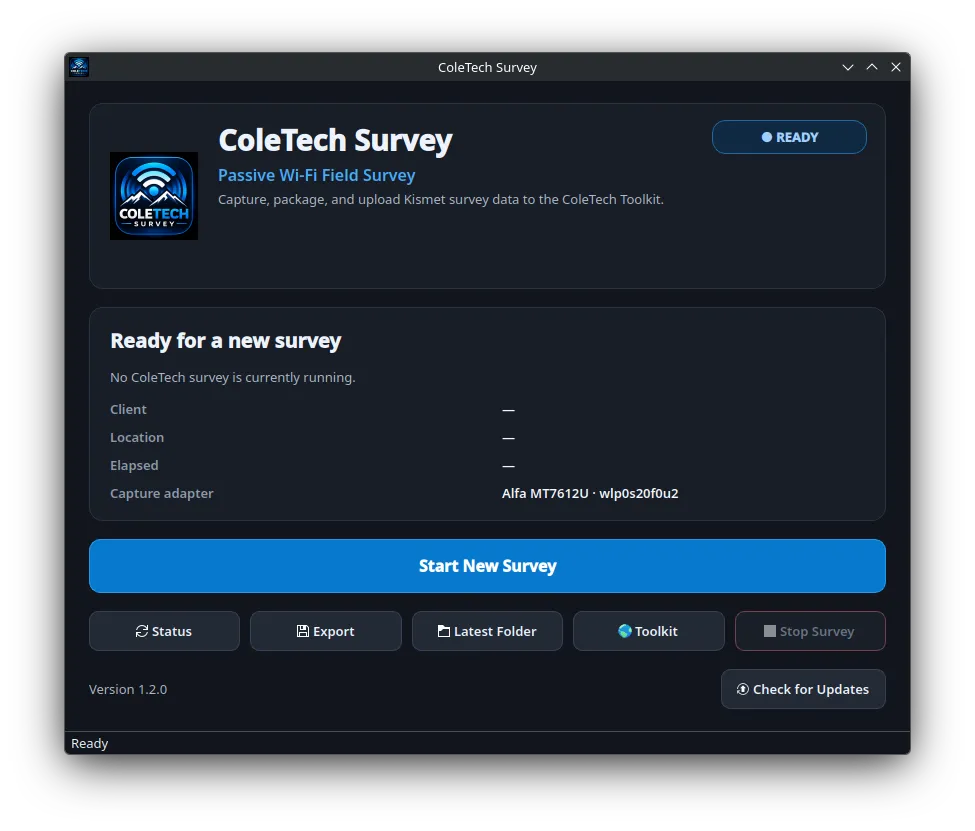
The application includes a branded header and a clear status area showing information such as:
Client
Location
Elapsed Time
Capture Adapter
The main application state is also immediately visible.
When nothing is running, the application displays:
READYWhen a survey is active, it transitions to:
SURVEY RUNNINGThe application periodically checks the backend state and updates the interface accordingly.
That means I can glance at the screen and immediately understand whether a survey is active without manually running a status command.
Automatic Wi-Fi Adapter Detection
One of the problems I specifically wanted to eliminate was manually identifying the correct Wi-Fi interface every time Linux assigned a different interface name.
The field-survey workflow uses an external Alfa MT7612U adapter for passive capture.
Linux interface names can vary depending on hardware enumeration, USB connections, or other system conditions.
Hard-coding something like:
wlan1would make the application unnecessarily fragile.
Instead, I added automatic capture-adapter detection.
The application can identify the external adapter based on the underlying hardware rather than relying entirely on a specific interface name.
Conceptually:
Available Network Interfaces
          │
          ▼
Inspect Hardware / Driver
          │
          ├── Internal Wi-Fi ──► Ignore
          │
          └── Alfa MT7612U ────► Select
The finished application now displays the detected adapter directly in the ready state.
That is a small feature from the user’s perspective, but an important one for reliability.
A field tool should tolerate changes in operating-system naming without requiring me to modify the application every time.
Starting a Survey
Starting a new survey begins by entering the client and location information.
The application then hands the request off to the existing survey backend.
Conceptually:
Qt Interface
     │
     ▼
Client + Location
     │
     ▼
coletech-survey
     │
     ▼
Kismet
     │
     ▼
Passive Capture
Kismet performs the actual wireless collection while ColeTech Survey handles the surrounding workflow.
Once the capture starts, the application switches into its active survey state.
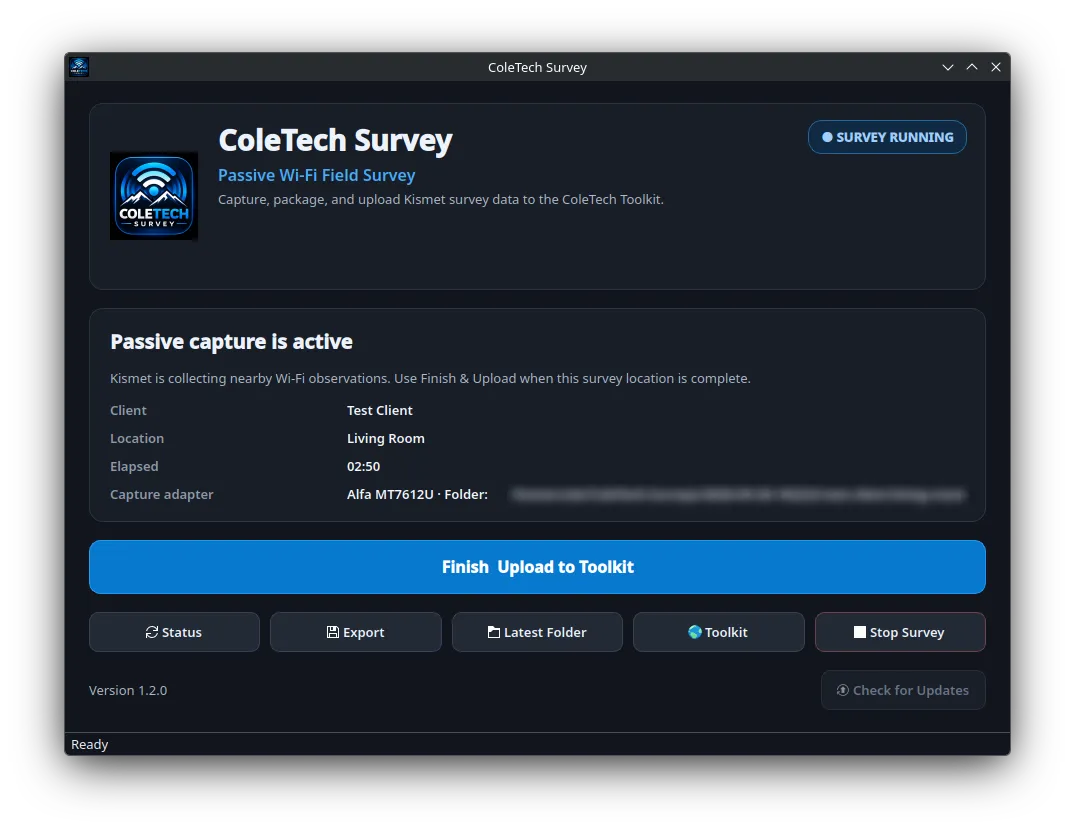
During an active survey, ColeTech Survey exposes the information I care about most in the field while Kismet continues performing the actual passive wireless capture.
The interface now shows:
- Survey status
- Client
- Location
- Elapsed time
- Capture hardware
- Survey folder
- Finish and upload controls
This is much easier to work with than checking several terminal sessions during an active survey.
Kismet Still Does the Heavy Lifting
The graphical application is not intended to replace Kismet.
Kismet remains the actual wireless capture engine.
ColeTech Survey provides workflow control around it.
The relationship looks roughly like this:
ColeTech Survey
      │
      ▼
Workflow Control
      │
      ▼
Kismet
      │
      ▼
Passive Wi-Fi Observations
This is an important part of the design.
Rather than attempting to recreate mature wireless-capture functionality myself, I can use Kismet for the part it already does extremely well and focus my own application on solving the workflow problem around it.
Keeping the Existing Backend
One design decision I am particularly happy with was not rewriting the original CLI application just because I now had a GUI.
The graphical application calls the existing tools rather than replacing them.
The architecture remains layered:
Qt GUI
   │
   ▼
CLI Backend
   │
   ▼
Kismet / Export / Packaging / API
There are several advantages to this.
The CLI can still be used independently.
The backend can still be tested without the GUI.
Fixes to survey logic do not necessarily require changes to interface code.
And the Qt application stays focused on what it should be responsible for:
presenting state and orchestrating the workflow.
Finishing a Survey
The end of the workflow is one of the areas where the graphical application made the largest usability improvement.
Previously, finishing a survey involved several separate operations.
The application brings those together into one guided process.
The overall workflow becomes:
Stop Kismet
    │
    ▼
Preserve Capture Data
    │
    ▼
Export Survey
    │
    ▼
Create Survey Package
    │
    ▼
Choose Toolkit Job
    │
    ▼
Upload Package
The finished survey is packaged so it can be uploaded into the ColeTech Toolkit.
That means the Qt application is not simply acting as a start and stop button for Kismet.
It manages the lifecycle of the field survey from beginning to handoff.
Integrating Directly with the ColeTech Toolkit
The next major step was integrating the application directly with the Toolkit.
The GUI can request the available jobs through the existing API tooling and present them inside a native job-selection dialog.
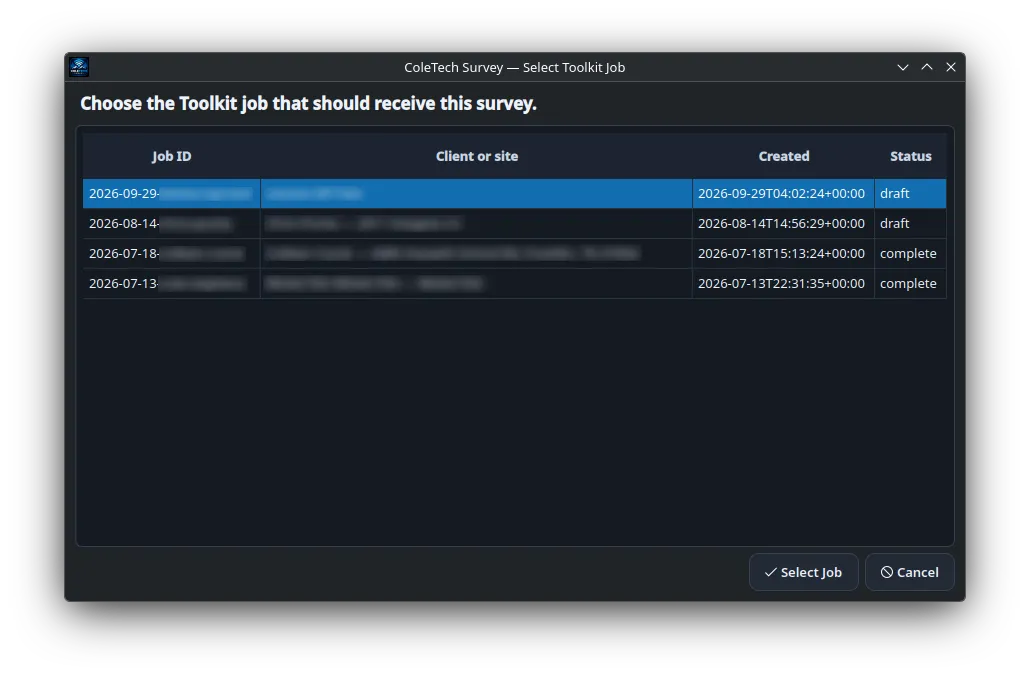
The Toolkit integration allows a completed survey to be associated with the correct job directly from the desktop application rather than requiring a separate manual upload workflow.
The basic flow is:
Survey
   │
   ▼
Finish & Export
   │
   ▼
Toolkit Job Selector
   │
   ▼
Selected Job
   │
   ▼
Upload Package
The application can retrieve Toolkit jobs using the backend API client instead of duplicating networking logic inside the GUI.
That means the Toolkit remains its own system while ColeTech Survey simply consumes the interface I already built for it.
Keeping Manual Controls Available
Even though I wanted the main workflow to be straightforward, I did not want to hide useful troubleshooting controls.
The application still provides separate actions for:
Status

Export

Latest Folder

Toolkit

Stop Survey

Check for Updates
That gives me a clean normal workflow while preserving ways to inspect or intervene when necessary.
I have found this balance useful in other tools as well.
The interface should make the common path easy without making the underlying system inaccessible.
State Management
The application keeps track of the active survey outside of the graphical window itself.
The GUI can read the current survey state and determine whether a collection is already running.
That means the important state belongs to the survey workflow rather than being trapped inside one application process.
Conceptually:
Survey Backend
      │
      ▼
Persistent State
      │
      ▼
Qt Application
      │
      ▼
Current UI State
This also makes the separation between the backend and frontend more useful.
The GUI is a view into the current survey rather than the only place where that survey exists.
Turning It Into a Real KDE Application
Once the Qt interface itself was working, I wanted ColeTech Survey to behave like a normal application on the laptop.
That meant going beyond:
python coletech-survey-qt.pyI created proper desktop integration including:
- A custom ColeTech Survey icon
- A KDE
.desktopentry - A dedicated GUI launcher
- Appropriate application categories
- Normal launcher behavior
The application launches through:
/usr/local/bin/coletech-survey-guiFrom the desktop’s perspective, ColeTech Survey now behaves like an installed Linux application.
I can open the application launcher, search for ColeTech Survey, click the icon, and start working.
That may sound like a relatively small detail, but it changed the way the project felt.
It stopped feeling like a script I happened to be developing and started feeling like software I had built.
Installation and Updating
Once the application reached that point, installation became another problem worth solving.
The complete application now consists of several pieces:
CLI Backend
     +
Qt GUI
     +
Toolkit API Client
     +
Icon
     +
Desktop Entry
     +
Configuration
     +
Python Dependencies
Manually recreating that environment on another Linux system would be error-prone.
I built installation and update tooling so those components can be deployed together more consistently.
The updater also needs to preserve local configuration rather than treating every upgrade as an entirely fresh installation.
That makes it possible for the application to continue evolving without making every release a manual rebuild of the workstation.
GitHub Releases and Versioning
The project is versioned through GitHub releases.
That gives me a development cycle that looks more like:
Develop
   │
   ▼
Test
   │
   ▼
Commit
   │
   ▼
Tag Release
   │
   ▼
Install / Update
ColeTech Survey has now reached v1.2.0 after adding and refining the native Qt interface, hardware autodetection, Toolkit integration, installation and update tooling, and the complete field-survey workflow.
The application also includes update-check functionality so I can compare the installed version against the available release.
For the current build:
Installed: 1.2.0
Latest:    1.2.0
Update available: No
Seeing version and update management inside an application that originally began as a few shell commands has been a particularly satisfying milestone.
What Went Well
Several parts of this project came together especially well.
The biggest success was preserving the original backend.
Because the command-line workflow already worked, I could spend most of my time improving the user experience instead of rewriting survey logic.
The Qt interface also fit the Linux environment extremely well.
PySide6 gave me access to a mature desktop framework while still letting most of the project remain in Python.
Automatic hardware detection removed one of the more annoying sources of fragility from the field workflow.
And direct Toolkit integration turned what had previously been several individual operations into one coherent process.
What Was Difficult
The most challenging part was not drawing the interface.
It was making the graphical application behave reliably around processes and state that already existed outside of it.
The application needed to understand questions like:
Is Kismet already running?

Which survey is active?

Which adapter is being used?

How long has the capture been running?

Where is the survey folder?

Has the export completed?

Which Toolkit job should receive the package?

Did the upload succeed?
Those are workflow and state-management problems rather than visual-design problems.
I also had to account for Linux network-interface naming.
A capture adapter that works perfectly during one test may appear under a different interface name later.
That pushed me toward detecting the hardware based on what it actually is instead of assuming the operating system will always assign it the same name.
Packaging the application introduced another layer.
Once a project includes:
- Backend commands
- GUI code
- Dependencies
- Configuration
- Desktop integration
- Icons
- Versioning
- Updates
deployment becomes part of the software problem too.
From Script to Application
The most rewarding part of the project has been watching the same workflow evolve through several stages.
It started as:
CommandsThen became:
Commands
   +
Shell Automation
Then:
CLI Workflow
   +
Toolkit API Integration
And now:
Native Qt Application
        │
        ├── Live Status
        ├── Hardware Detection
        ├── Kismet Control
        ├── Export / Packaging
        ├── Toolkit Jobs
        ├── Direct Upload
        ├── KDE Integration
        ├── Versioning
        └── Update Management
The underlying purpose never really changed.
What changed was how usable, reliable, and integrated the workflow became.
What I Learned
This project taught me quite a bit about the difference between writing scripts and building an application.
My biggest takeaways were:
- A working CLI backend can be an excellent foundation for a graphical application
- Separating interface code from backend logic makes both easier to maintain
- Real applications need to manage state, not just respond to button clicks
- Hardware detection is more reliable than hard-coded interface names
- Mature tools such as Kismet can be integrated rather than recreated
- Native desktop integration has a major impact on usability
- Installation and updating become part of the project once multiple components are involved
- User interfaces should simplify the common workflow without removing troubleshooting access
- APIs become much more valuable when multiple tools can build on them
- The most useful automation often comes from connecting several individually simple steps into one dependable workflow
Final Result
ColeTech Survey is now a native Linux desktop application that manages my complete Wi-Fi field-survey workflow.
The finished system looks roughly like this:
                  ColeTech Survey
                        │
          ┌─────────────┼─────────────┐
          │             │             │
          ▼             ▼             ▼
     Qt Interface    Kismet       Toolkit API
          │             │             │
          ▼             ▼             ▼
     Workflow UI    Wi-Fi Data    Job Management
          │             │             │
          └─────────────┼─────────────┘
                        │
                        ▼
                 Survey Package
                        │
                        ▼
                  ColeTech Toolkit
What I am most proud of is not simply that the application now has a graphical interface.
It is that the entire workflow feels cohesive.
I can launch the application from KDE, verify that the correct capture hardware has been detected, start a survey, monitor its status, finish the collection, export and package the results, select the appropriate Toolkit job, and upload the finished survey without jumping between several unrelated tools.
The CLI backend still exists.
Kismet still performs the wireless capture.
The Toolkit still manages the job data.
The Qt application brings all of those pieces together into something that feels like one product.
That transition from a collection of scripts into a tool I actually enjoy using has been one of the most satisfying software projects I have completed so far.